Sitewalk / Guides / Security headers / Content Security Policy header
Content Security Policy header: check it and add one
A Content-Security-Policy header is a line your server sends with each page. It tells the browser which sources it may load scripts, styles, images and frames from.
The safe way to add one is to test it in report-only mode first, read what it would block, and only then switch it on. This guide shows how to check yours, which first policy is safe to ship today, and how to grow it into one that protects your scripts.
What the header does and why it matters
MDN describes the header as a way for site administrators to control the resources a browser may load for a page. Its main use is to defend against cross-site scripting (XSS), where an attacker gets their own code to run inside your page.
If that happens, the attacker's code can do what your own code can do. MDN lists examples: read or change the page, read or change local storage, and send requests with the visitor's credentials.
A policy cuts that off. It can block scripts from unknown hosts, inline scripts and eval(). MDN says it sits next to good input handling and does not replace it: sanitize input and set a policy, so one layer still works when the other fails.
We did not find a Google statement that says this header affects rankings, so we make no ranking claim. The reason to care is security.
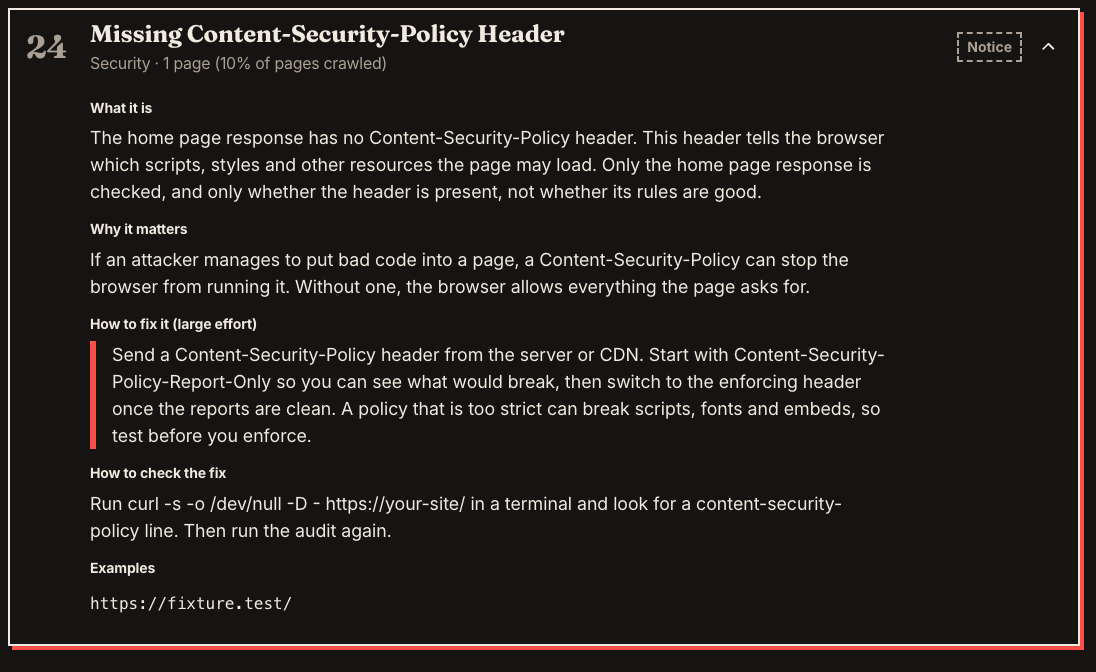
Sitewalk looks at the response your home page sends and flags the header when it is missing. It checks that the header is present. It does not judge how good the rules are.
The directives you will meet first
A policy is a list of directives separated by semicolons. Each directive is a name followed by its allowed sources. These are the ones most sites need to read.
| Directive | What it controls |
|---|---|
default-src | The fallback for the other fetch directives, such as images, fonts and scripts |
script-src | Where JavaScript may come from |
style-src | Where stylesheets may come from |
img-src | Where images and favicons may come from |
object-src | The <object> and <embed> elements |
base-uri | Which URLs a <base> element may use |
frame-ancestors | Which pages may embed yours in a frame |
report-to | Where violation reports are sent |
Two source words come up constantly. 'self' means the same origin as the page. 'none' blocks the resource type completely. Both keep their single quotes.
One detail catches people out. MDN says frame-ancestors does not fall back to default-src. A policy with default-src 'none' still lets anyone embed your page. Set frame-ancestors on its own line if you want that protection.
How to check yours
Run this and look for the policy line. Replace example.com with your domain.
curl -sI https://example.com/ | grep -i content-security-policy
No output means no policy. If your site sits behind a CDN, check the address visitors really use, because the CDN can add or remove headers.
On 23 Nov 2026 we ran the same command against our own site. It printed:
content-security-policy: frame-ancestors 'self'; base-uri 'self'; object-src 'none'
You can also read it in the browser: developer tools, Network tab, reload, click the first request, read Response Headers.
Look for a second line named content-security-policy-report-only. That header reports and enforces nothing, so a site with only that line is still unprotected. We have not confirmed how the Sitewalk check treats it, so count the fix as done once the enforcing header is live.
Step 1: ship a small policy that breaks nothing
Start with a policy that only closes three doors. Most sites use none of them.
Content-Security-Policy: frame-ancestors 'self'; base-uri 'self'; object-src 'none'
frame-ancestors 'self'stops other sites from putting your pages in a frame.base-uri 'self'stops injected<base>tags from changing where your relative links point.object-src 'none'blocks old plugin embeds.
This is the policy our own site sends. It does not restrict scripts, so it will not stop an XSS attack on its own. It is a safe first header and it adds clickjacking protection in the same line.
Step 2: test a script policy in report-only mode
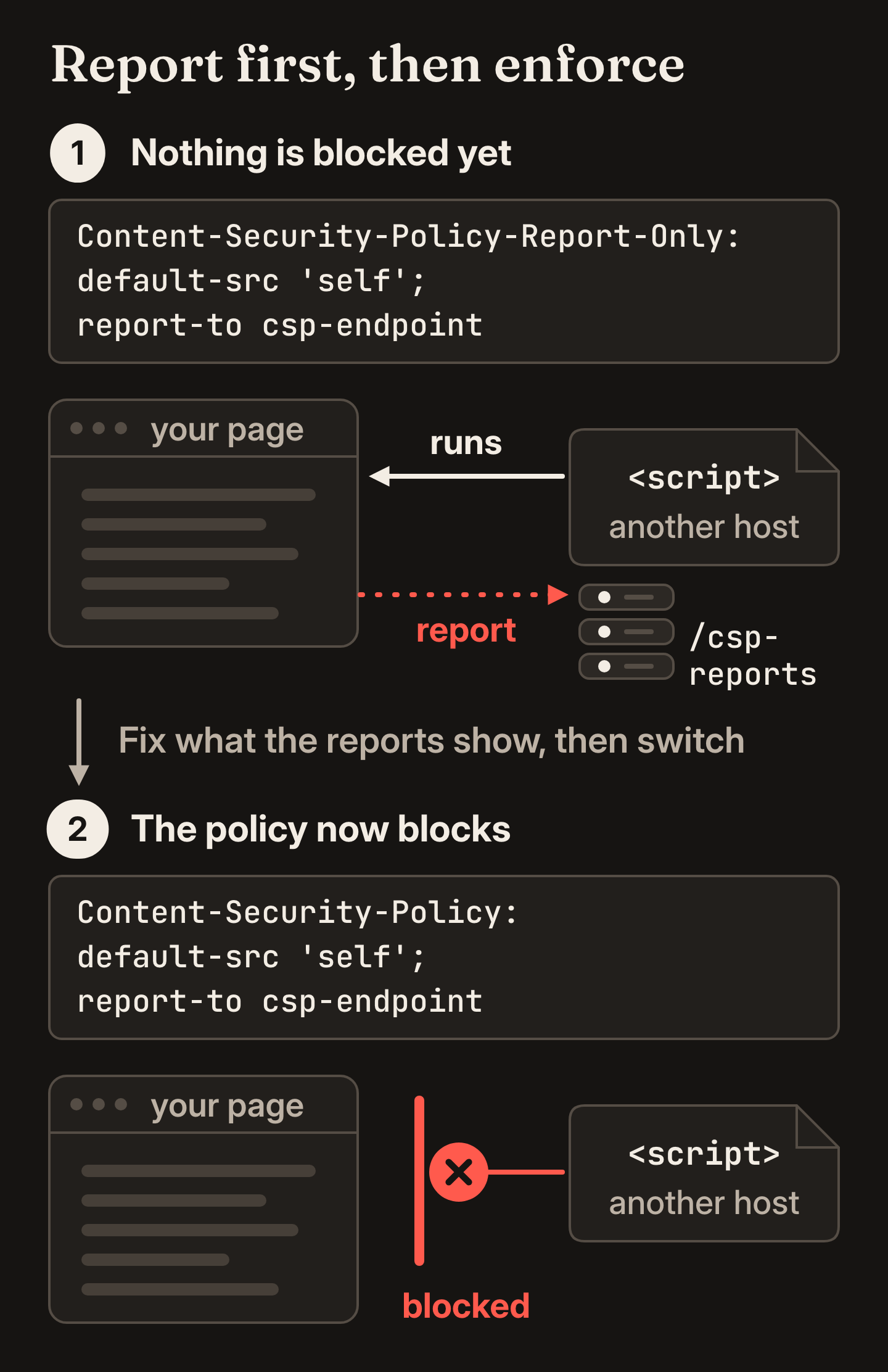
To control scripts you need a stricter policy, and a stricter policy can break your pages. Report-only mode lets you see the damage before anyone feels it. MDN says the policy is not enforced, and violations go to the endpoint you name.
Report-only needs a place to send reports. MDN says the report-to directive must be specified or the header has no effect. You define the endpoint with a second header, Reporting-Endpoints.
Reporting-Endpoints: csp-endpoint="https://example.com/csp-reports"
Content-Security-Policy-Report-Only: default-src 'self'; report-to csp-endpoint
The address in Reporting-Endpoints has to be a server of yours that accepts the reports. MDN says you must set that up yourself.
Browsers also log violations in the developer tools console. MDN lists messages such as "A violation occurred for a report-only CSP policy... The behavior was allowed, and a CSP report was sent".
default-src 'self' is a strict starting point. MDN says that once a policy has default-src or script-src, inline scripts and eval() stop working, and that default-src or style-src also blocks inline styles. Expect your first report to be long.
Step 3: read the reports and fix what they show
Text version
Two stages. First, a report-only policy: a script from another host still runs and the browser sends a report to /csp-reports. After fixing what the reports show, the enforcing Content-Security-Policy header with default-src 'self' blocks that script.
Each report names something that was blocked. These are the usual causes and fixes.
| What was blocked | Fix |
|---|---|
An inline <script> | Move it to a file, or give it a nonce or a hash |
An inline event handler such as onclick | Replace it with addEventListener() in a script file |
| A script from another host | Add that host to script-src, or use a nonce with 'strict-dynamic' |
| An image, font or embed from another host | Add the host to img-src, font-src or frame-src |
eval() or a string passed to setTimeout() | Rewrite the code. 'unsafe-eval' works but MDN says to avoid it |
An inline style attribute | Move the style to a stylesheet |
A nonce is a random value your server generates for every response. You put it in the policy and in the nonce attribute of each script you trust.
MDN says it must be different every time and unpredictable, so the server cannot serve fixed static HTML. A hash is the fingerprint of one script. It suits static pages, but you must recalculate it whenever the script changes, and external scripts need an integrity attribute too.
MDN calls a policy built on nonces or hashes a strict CSP and recommends it over a list of allowed hosts, because host lists are hard to get right and hard to maintain.
Avoid 'unsafe-inline'. MDN warns it defeats much of the purpose of having a policy. MDN also says browsers ignore 'unsafe-inline' in a directive that already has a nonce or a hash, so adding it next to one changes nothing.
Repeat until your key pages produce no new reports.
Step 4: switch to the enforcing header
When the reports are quiet, send the same value in Content-Security-Policy.
Content-Security-Policy: default-src 'self'; report-to csp-endpoint
You can keep both headers. MDN says both are honored in the same response: one is enforced and the other only reports, so you can test the next change while the current policy is live.
Where to set the header
Use the place you control. A CDN rule, your host's header settings or a security plugin with a headers screen all work, and then your server config. MDN says to set it on all responses, not only the main page.
Apache. This needs mod_headers. We ran it on Apache 2.4.67 on 23 Nov 2026 and read the headers back with curl. All three headers came back as written.
Header always set Reporting-Endpoints 'csp-endpoint="https://example.com/csp-reports"'
Header always set Content-Security-Policy-Report-Only "default-src 'self'; report-to csp-endpoint"
Header always set Content-Security-Policy "frame-ancestors 'self'; base-uri 'self'; object-src 'none'"
nginx. We did not test this one. Put it in the server block and reload.
add_header Content-Security-Policy "frame-ancestors 'self'; base-uri 'self'; object-src 'none'" always;
In nginx, a location block that has its own add_header line ignores the add_header lines above it. Repeat the headers in that block.
Common mistakes
Using a meta tag. MDN says the meta route does not support all features. frame-ancestors is not supported there, and a report-only policy cannot be delivered in a meta element. Send real headers.
Turning on enforcement without testing. A strict policy that has never been through report-only will often block something you need, such as a font, a chat widget or a payment script.
Reusing one nonce. If a cached page carries a fixed nonce, every visitor gets the same value and the nonce protects nothing. MDN says it must change on every response.
Two layers sending two policies. MDN says adding a second policy can only restrict further. If your server and your CDN both send one, the strictest rule wins. A rule you thought was allowed can be blocked by the other layer.
Check it worked
- Run the
curlcommand again and confirm thecontent-security-policyline is there. - Load your home page, a blog post, a page with a form and any page with an embed. Open the browser console and look for blocked resource messages.
- Click through anything that depends on scripts: menus, search, forms, chat and checkout.
- If a feature broke, find its blocked source in the console, allow that source in the right directive, and test again.
- Run the Sitewalk audit.
MDN also points to Google's CSP Evaluator for a second opinion on a policy.
Related headers
Next to this one, look at the HSTS header, which keeps visitors on https, and X-Content-Type-Options, which stops browsers guessing file types.
What Sitewalk found on real sites
Counted on 23 Nov 2026, from the latest audit of each site.
Of 89 sites audited since the check went live on 4 Nov 2026, 56 (62.9%) sent no Content-Security-Policy header. That is a little higher than the clickjacking protection gap, which was 70 of 119 sites (58.8%). Our own site, sitewalkseo.com, sends the small policy from Step 1, checked on 23 Nov 2026. This is a small early-user group, a first look and not a survey.
Questions people ask
What is a Content-Security-Policy header?
It is an HTTP response header that tells the browser which sources it may load resources from for a page. Its main job is to limit the damage from cross-site scripting.
What does CSP report-only mean?
Content-Security-Policy-Report-Only sends the same kind of policy but enforces nothing. The browser reports what it would have blocked. It needs a report-to directive to send reports, and it cannot be set in a meta tag.
Will adding a CSP break my site?
A strict one can. Once a policy has default-src or script-src, inline scripts and eval() stop working. That is why you test in report-only mode first and fix what the reports show.
Do I need a CSP if I already have X-Frame-Options?
They do different jobs. X-Frame-Options only controls framing. A policy can also control scripts, styles, images and more, and its frame-ancestors directive replaces X-Frame-Options for framing. Our clickjacking guide covers the pair.
Check your whole site in one sentence
Sitewalk checks these headers along with 200+ other technical SEO checks. In ChatGPT, say:
Audit example.com for technical SEO problems
Checked on 23 Nov 2026. Header behavior is from the MDN Web Docs pages on Content Security Policy, the Content-Security-Policy header, the report-only header and CSP errors, all read on 23 Nov 2026. Sitewalk counts are from 89 audited sites since 4 Nov 2026 and 119 audited sites for the clickjacking comparison, each site's latest audit: a small early-user group, a first look and not a survey.