Sitewalk / Guides / Canonical tags and duplicates / Canonical tags
Canonical tags: how to check them and fix 6 problems
A canonical tag tells search engines which address you want kept when the same page loads at several addresses. It is a hint and not a command, and it works best when each page names one clear, working address.
This guide shows you how to read the tag on your pages, how to check them all with a script, and how to fix the six problems Sitewalk reports.
What a canonical tag is and why it matters
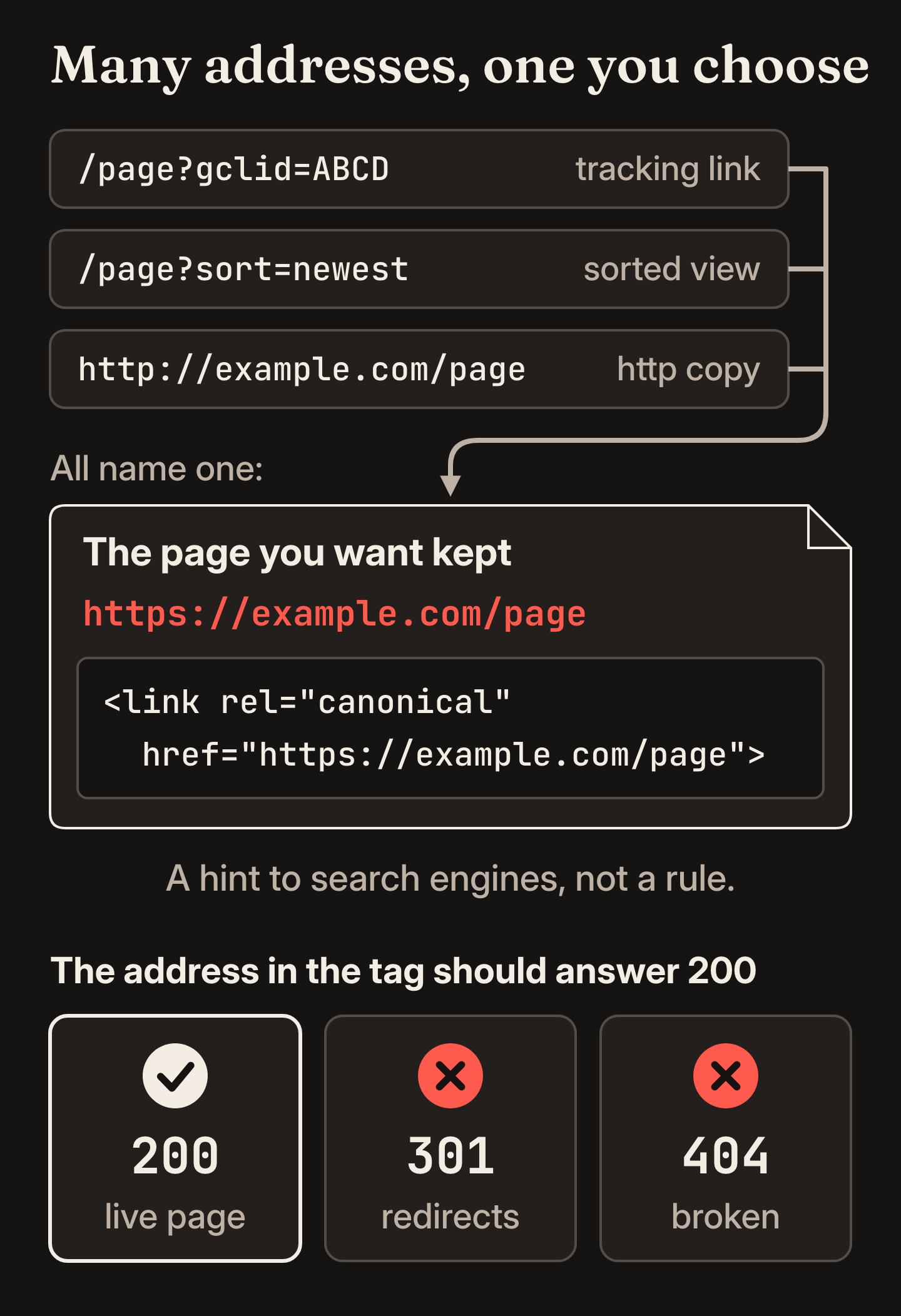
The same page can load at many addresses without you meaning it to. A tracking link adds ?gclid=ABCD. A shop adds ?sort=newest.
The http version still answers next to the https one. To a search engine each address is a separate page with the same content.
Google calls the process of choosing one of them canonicalization. It groups pages whose main content looks the same, picks the one it judges most complete and useful, and marks it canonical. That page is crawled most often, and the duplicates less often.
A canonical tag is how you tell Google your choice. Google's guidance gives four reasons to bother:
- You pick the address people see in search results.
- Links and other signals to the duplicates are consolidated into the one you chose.
- You track one address's numbers instead of five.
- Googlebot spends less time crawling copies.
Google also says none of this is required, because it will pick a version itself. The tag is for when you want to be the one who decides. On whether the tag is binding, the wording is plain: "indicating a canonical preference is a hint, not a rule."
Some duplication is normal. Google says duplicate content on a site is not a violation of its spam policies. The cost is a confused searcher and harder tracking, not a penalty.
How to check yours
Open the page, choose View Source, and search for canonical. You want exactly one tag, in the head, with a full address:
<link rel="canonical" href="https://example.com/the-page/">
From the command line, this prints every canonical tag on a page:
curl -s https://example.com/the-page/ | grep -io '<link[^>]*canonical[^>]*>'
To check the address in the tag, ask for it without following redirects:
curl -sI https://example.com/the-address-in-the-tag | head -1
You want 200. A 301 or 404 is a problem, and the table below says which.
To check every page, save this script as canon_check.py. It reads your sitemap, then for each page reads the canonical tag and fetches the address it names.
import re,sys,urllib.request,urllib.error,urllib.parse,html
class NoRedirect(urllib.request.HTTPRedirectHandler):
    def redirect_request(self,*a,**k): return None
op=urllib.request.build_opener(NoRedirect)
def get(u):
    try:
        r=op.open(urllib.request.Request(u,headers={"User-Agent":"canonical-check"}),timeout=20)
        return r.status,r.read().decode("utf-8","replace")
    except urllib.error.HTTPError as e: return e.code,""
def canon(h):
    out=[]
    for tag in re.findall(r"<link\b[^>]*>",h,re.I):
        if re.search(r"rel=[\"']canonical[\"']",tag,re.I):
            m=re.search(r"href=[\"'](.*?)[\"']",tag,re.I)
            out.append(html.unescape(m.group(1)) if m else "")
    return out
for u in re.findall(r"<loc>(.*?)</loc>",get(sys.argv[1])[1]):
    s,h=get(u); c=canon(h); note=[]
    if not c: note.append("MISSING")
    elif len(c)>1: note.append("MULTIPLE %d"%len(c))
    else:
        t=c[0]
        if not t.startswith("http"): note.append("RELATIVE")
        elif t!=u:
            ts,th=get(t)
            if ts in (301,302,307,308): note.append("DIFFERENT, target redirects (%d)"%ts)
            elif ts!=200: note.append("DIFFERENT, target answers %d"%ts)
            else:
                tc=canon(th)
                note.append("DIFFERENT"+(", chain: target names "+tc[0] if tc and tc[0]!=t else ""))
    print(("ok        " if not note else "CHECK     ")+u+("  "+"; ".join(note) if note else ""))
Run it with your sitemap address:
python3 canon_check.py https://example.com/sitemap.xml
We tested it on 23 Nov 2026 against a small local test site that had one page of each kind. It printed this:
ok        http://127.0.0.1:8793/ok
CHECK     http://127.0.0.1:8793/none  MISSING
CHECK     http://127.0.0.1:8793/two  MULTIPLE 2
CHECK     http://127.0.0.1:8793/rel  RELATIVE
CHECK     http://127.0.0.1:8793/variant  DIFFERENT
CHECK     http://127.0.0.1:8793/toredir  DIFFERENT, target redirects (301)
CHECK     http://127.0.0.1:8793/tobroken  DIFFERENT, target answers 404
CHECK     http://127.0.0.1:8793/a  DIFFERENT, chain: target names http://127.0.0.1:8793/c
On the sitewalkseo.com sitemap the same day it checked 46 pages and all 46 came back ok: one tag each, naming the page itself.
Two limits. The script reads the HTML the server sends, so a canonical added later by JavaScript will look missing. And a DIFFERENT line is not automatically wrong, as the next section explains.
The six problems and what to do
| What you see | The problem | Fix |
|---|---|---|
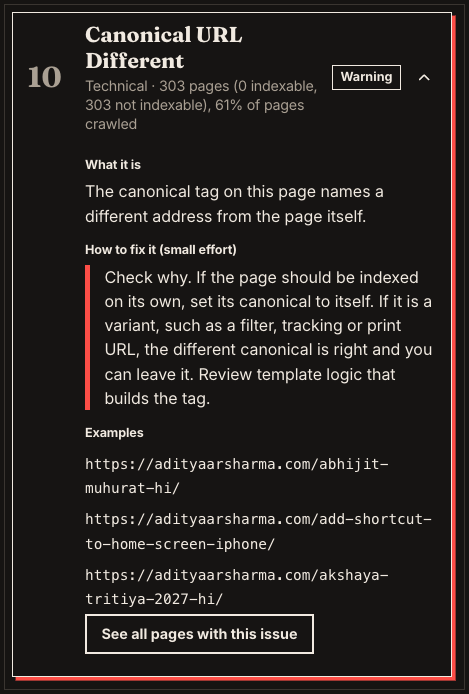
| The tag names a different page | Canonical URL different: right when the page is a variant, such as a filter, a tracking link or a print version, and wrong when it should be found on its own. | Decide which it is: point the tag at the page itself if it should be indexed, or leave it if it is a variant. |
| No tag at all | Missing canonical. Google picks the preferred address itself. | Add a tag in the head pointing at the page's own full address. |
| Page A names B, and B names C | Canonical chain. The address that ends up kept may not be the one you wanted. | Point every page straight at the final one, which names itself. |
| The tag names an address that redirects | Canonical points to a redirect. Usual causes are a missing trailing slash, http instead of https, or a www mismatch. | Change the tag to the address the redirect lands on. |
| The tag names an address that errors | Canonical points to a broken page. The hint is of no use. | Point it at a working page, usually the page itself. Look for a typo or a stale domain after a move. |
| Two tags, or a tag and a header that disagree | Multiple canonical tags. Mixed signals. A theme and an SEO plugin both printing one is the common cause. | Keep one source and turn the other off. |
The first problem needs a decision and the other five need a fix. If the script shows many DIFFERENT lines, look at a handful before changing anything. On a shop, a filtered address that names the main category page is the tag working.
Which signal wins
Google lists the ways to state a preference in order of strength.
| Method | Strength |
|---|---|
| Redirect | Strong signal that the target should be canonical |
rel="canonical" link | Strong signal that the address should be canonical |
| Sitemap inclusion | Weak signal |
Google says these stack, so using more than one raises the chance that your choice is the one shown. The catch is that they have to agree. Google's advice is not to name different addresses for the same page with different methods, for example one in the sitemap and another in the tag.
Canonical problems often sit next to other problems. Our guides on www and https versions and on redirect chains and loops cover the redirect side. Our guide on duplicate titles covers a symptom you will often see next to missing canonicals.
How to fix it
Text version
Three variants (a tracking link, a sorted view and an http copy) all name https://example.com/page with a rel=canonical tag. The tag is a hint, not a rule. The address in the tag should answer 200, not a 301 redirect or a 404.
Plain HTML. Add this in the head of each page, with the full address of that page:
<link rel="canonical" href="https://example.com/dresses/green-dresses">
Google asks for absolute addresses. It says relative paths are supported but can cause problems later, for example if a test copy of your site gets crawled. The tag is only accepted in the head, so make sure the head is valid HTML.
WordPress with Yoast SEO. Yoast's documentation says the plugin adds canonical tags to pages and archives by default. To change one, open the post or page, go to Advanced in the Yoast sidebar, paste the full address in the Canonical URL field and save.
Yoast also says it does not print a canonical on pages set to noindex. If you see two tags, check that your theme is not printing a second one.
Shopify. Shopify's own themes define a canonical by default with {{ canonical_url }}. If your theme has none, one line before the closing </head> in the theme layout adds it:
<link rel="canonical" href="{{ canonical_url }}">
Next.js. Set alternates.canonical in the page's metadata. In the documentation it looks like this:
export const metadata = {
  alternates: {
    canonical: 'https://nextjs.org',
  },
}
We read the Yoast, Shopify and Next.js documentation today, but we did not run those three snippets, so test them on your own site.
Files that are not web pages. A PDF has no head, so use an HTTP header instead. Google supports the Link header with rel="canonical" for web search, including non HTML files. This Apache rule, tested on 23 Nov 2026 with Apache 2.4 and mod_headers, tells Google the PDF is the canonical version of a Word file:
<Files "white-paper.docx">
  Header set Link "<https://example.com/downloads/white-paper.pdf>; rel=\"canonical\""
</Files>
A request for the .docx file returned Link: <https://example.com/downloads/white-paper.pdf>; rel="canonical", and the PDF itself returned no such header. Google recommends choosing either the tag or the header and sticking with it, because using both is more error prone.
Common mistakes
Blocking the duplicates with robots.txt. Google says not to use robots.txt for canonicalization, because it may still index a blocked address without its content.
Using noindex to pick a canonical. Google does not recommend it. It blocks the page from search entirely, and the canonical tag is the preferred tool.
Naming a fragment. Google says a URL fragment, the part after #, should not be given as canonical, because it generally does not support fragments.
Using the canonical tag for language versions. Google ignores rel="canonical" annotations that carry hreflang, lang, media or type attributes. For translations, use rel="alternate" with hreflang.
Pointing every page of a list at page one. If page 2 and 3 of a category all name page 1 as canonical, you are telling search engines they are copies. Each page of a list should name itself.
Check it worked
- Run
canon_check.pyagain. TheCHECKlines should be gone, or only the variants you chose to keep. - View source on a page you changed and confirm there is exactly one tag.
- Open the address in the tag in a browser and confirm it loads without a redirect.
- Make sure the sitemap lists the same address as the tag.
- Re-run the Sitewalk audit and compare.
Google needs to recrawl a page to notice the change, so give it time before you judge.
What Sitewalk found on real sites
Counted on 23 Nov 2026, from the latest audit of each site.
We counted sites with at least one page showing the problem, on the latest audit of each of 119 audited sites. These are early users, so it is a first look and not a survey.
- 74 of 119 sites (62%) had a page whose canonical named a different address. Often that is right, because the page is a filter or tracking variant. Read it as a prompt to check, not as an error.
- 58 of 119 sites (49%) had at least one page with no canonical tag. Sitewalk reports this as a warning.
- 4 had a canonical that points to a redirect.
- None had a canonical chain or a canonical that points to a broken page. Of the 89 sites checked for it, none had two canonical tags. For those problems there is no number to report.
Questions people ask
What is a canonical tag?
It is a <link rel="canonical"> line in the head of a page. It names the address you want search engines to treat as the main one when the same content is reachable at several.
Does every page need a canonical tag?
Google says none of the methods are required and that it will pick a version itself. It does recommend a self referencing canonical on the page you want kept. A tag on every page that names itself is the simplest rule to follow.
Will Google always follow my canonical tag?
No. Google's canonicalization guidance says a preference is a hint, not a rule, and that Google may choose a different page for various reasons. Agreeing signals from redirects, the sitemap and internal links make your choice more likely to stick.
What is the difference between a canonical tag and a 301 redirect?
A redirect sends visitors and crawlers to the other address, so the old one stops showing a page. A canonical tag leaves both addresses working and only says which one you prefer. Use a redirect when you are retiring the duplicate, and a canonical tag when both need to stay reachable.
Can I put the canonical in an HTTP header instead?
Yes, for web search. It is the way to do it for PDFs and other files with no HTML head. Pick the header or the tag, not both.
Check your whole site in one sentence
Audit example.com for technical SEO problems
Checked on 23 Nov 2026. Sources, all read on 23 Nov 2026: Google Search Central, "How to specify a canonical URL with rel=canonical and other methods" (developers.google.com/search/docs/crawling-indexing/consolidate-duplicate-urls) and "What is canonicalization" (developers.google.com/search/docs/crawling-indexing/canonicalization); Yoast, "rel canonical" (yoast.com/rel-canonical); Shopify, "set canonical URL" (shopify.com/blog/set-canonical-url-shopify); Next.js generateMetadata documentation (nextjs.org/docs/app/api-reference/functions/generate-metadata). The script and the Apache rule were run on 23 Nov 2026, and Sitewalk counts are from 119 audited sites, each site's latest audit (89 for the check added on 4 Nov 2026).