Sitewalk / Guides / Links / Orphan pages
Orphan pages: how to find them and link them back in
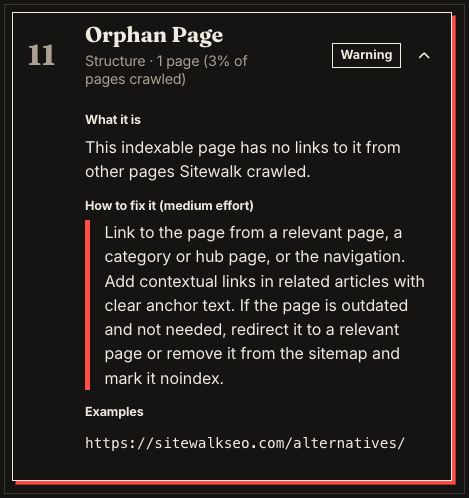
An orphan page is a live page that no other page on your site links to. Visitors cannot click their way to it, and Google, which finds pages mostly by following links, has to learn about it some other way.
This guide covers the orphan and three weaker versions of the same problem. You will get a script that finds them, a way to decide what each page needs, and the link markup that Google can actually follow.
What an orphan page is and why it matters
Google's SEO starter guide says Google primarily finds pages through links from other pages it already crawled. Its link guidance adds that Google uses links as a signal for the relevance of pages and to find new pages to crawl.
Google's sitemap guidance spells out what follows. If a site is properly linked, Google can usually discover most of it. On large sites it is harder to make sure every page is linked by at least one other page, so Googlebot might not discover some new pages. Google says a sitemap can improve crawling for larger or more complex sites.
An orphan can still be found. Another site may link to it, or it may sit in your sitemap. What it lacks is a path inside your own site, so a visitor on your home page has no way to reach it.
Sitewalk reports four related problems.
| Problem | What it means | How urgent |
|---|---|---|
| Orphan page | An indexable page that no other page Sitewalk crawled links to | High for pages you want found |
| Only one internal link in | One link holds the page up. If it changes, the page becomes an orphan | Medium |
| Dead end page | The page links to no other page on your site, only outside it | Medium, mostly a visitor problem |
| Only linked from noindex pages | Every page that links to it is set to noindex | Medium |
How orphans happen
Orphans are usually accidents. Common causes:
- A page was published and never added to a menu, a category or a related post.
- A redesign changed the navigation and dropped old pages.
- A product was removed from a category listing but its page still works.
- A landing page was made for a campaign and the campaign ended.
- Links were built with JavaScript, and the crawler never saw them.
Some orphans are meant to exist. A thank you page is reached only from a form, and noindex is the right setting for it.
How to check one page
Open your main navigation, one category page and one related article. Look for a link to the page.
Check the markup too. Google says it can generally crawl a link only if it is an <a> element with an href attribute. Links that depend on script events, such as an onclick with no href, a <span> with a link address, or an <a> with no href, are not reliably parsed.
<a href="https://example.com/guides/internal-links">Internal links guide</a>
That is a link Google can follow. A button that runs a script to change the page is not.
How to find every orphan on your site
A person cannot see every page's inbound links, so use a crawler. The rule is simple: crawl from the home page by following links, then compare the pages you reached with the pages you know exist, such as the ones in your sitemap. Any page in the sitemap that the crawl never reached is an orphan.
This script does that for a small site. It uses only Python's standard library, waits one second between requests and stops at 200 pages. It also lists pages with exactly one internal link in and pages with no internal links out.
import sys, time, re, urllib.request, urllib.parse
from html.parser import HTMLParser
from collections import defaultdict

class L(HTMLParser):
    def __init__(s):
        super().__init__(); s.hrefs = []
    def handle_starttag(s, tag, attrs):
        if tag == "a" and dict(attrs).get("href"): s.hrefs.append(dict(attrs)["href"])

def get(url):
    return urllib.request.urlopen(url, timeout=15).read().decode("utf8", "replace")

home = sys.argv[1].rstrip("/") + "/"
host = urllib.parse.urlparse(home).netloc
norm = lambda u: urllib.parse.urldefrag(u)[0]
in_links, out_links, seen, queue = defaultdict(set), defaultdict(set), set(), [home]
while queue and len(seen) < 200:
    url = queue.pop(0)
    if url in seen: continue
    seen.add(url)
    try: p = L(); p.feed(get(url))
    except Exception: continue
    for h in p.hrefs:
        t = norm(urllib.parse.urljoin(url, h))
        if urllib.parse.urlparse(t).netloc == host and t != url:
            out_links[url].add(t); in_links[t].add(url); queue.append(t)
    time.sleep(1)

sitemap = set(re.findall(r"<loc>\s*([^<\s]+)\s*</loc>", get(home + "sitemap.xml")))
print("crawled", len(seen), "pages; sitemap lists", len(sitemap))
for u in sorted(sitemap - seen): print("ORPHAN (in sitemap, no link found):", u)
for u in sorted(seen - {home}):
    if len(in_links[u]) == 1: print("ONE LINK IN:", u, "from", next(iter(in_links[u])))
for u in sorted(seen):
    if not out_links[u]: print("DEAD END (no internal links out):", u)
Save it as find_orphans.py and run python3 find_orphans.py https://example.com/. It expects your sitemap at /sitemap.xml. If your site uses a sitemap index, change the sitemap = line to read one of the child sitemaps.
We tested it on a five page demo site with a known layout. It reported two sitemap pages that nothing linked to as orphans, one page with a single link in, and one page whose only links go out to another site as a dead end.
We also ran it on sitewalkseo.com on 23 Nov 2026. It crawled 55 pages against 46 in the sitemap and found no sitemap page that the crawl could not reach. It also listed a few items you would read and not act on: pagination pages with a single link from the previous page, two sample report files in PDF and CSV form, and two report demo addresses. Read the output with judgment.
Two limits. The script reads only the HTML your server sends, so pages whose links are added by a script look like dead ends. See pages that need JavaScript to show content. And it only knows about pages that are in your sitemap, so it will not find an orphan that is missing from both.
For those, compare against another list: pages that get traffic in your analytics, pages Google Search Console reports, or the files in your CMS.
Decide what each page needs
Decide the page's job before you add links.
| Page | What to do |
|---|---|
| Important page that should rank | Link to it from at least two relevant pages and from a menu or hub page |
| Useful but minor page | Link from one related article and one category or list page |
| Short utility page such as thank you or login | Leave it unlinked and set noindex |
| Old page nobody needs | Redirect it to a close match, or remove it and return 404 or 410 |
| Near copy of another page | Merge it, then redirect (see redirect chains and loops so the old addresses do not stack up) |
| Thin page with no purpose | Expand it or remove it (see thin content) |
Many orphans are leftovers, and linking to a leftover keeps a page alive that should be gone.
How to fix each problem
Text version
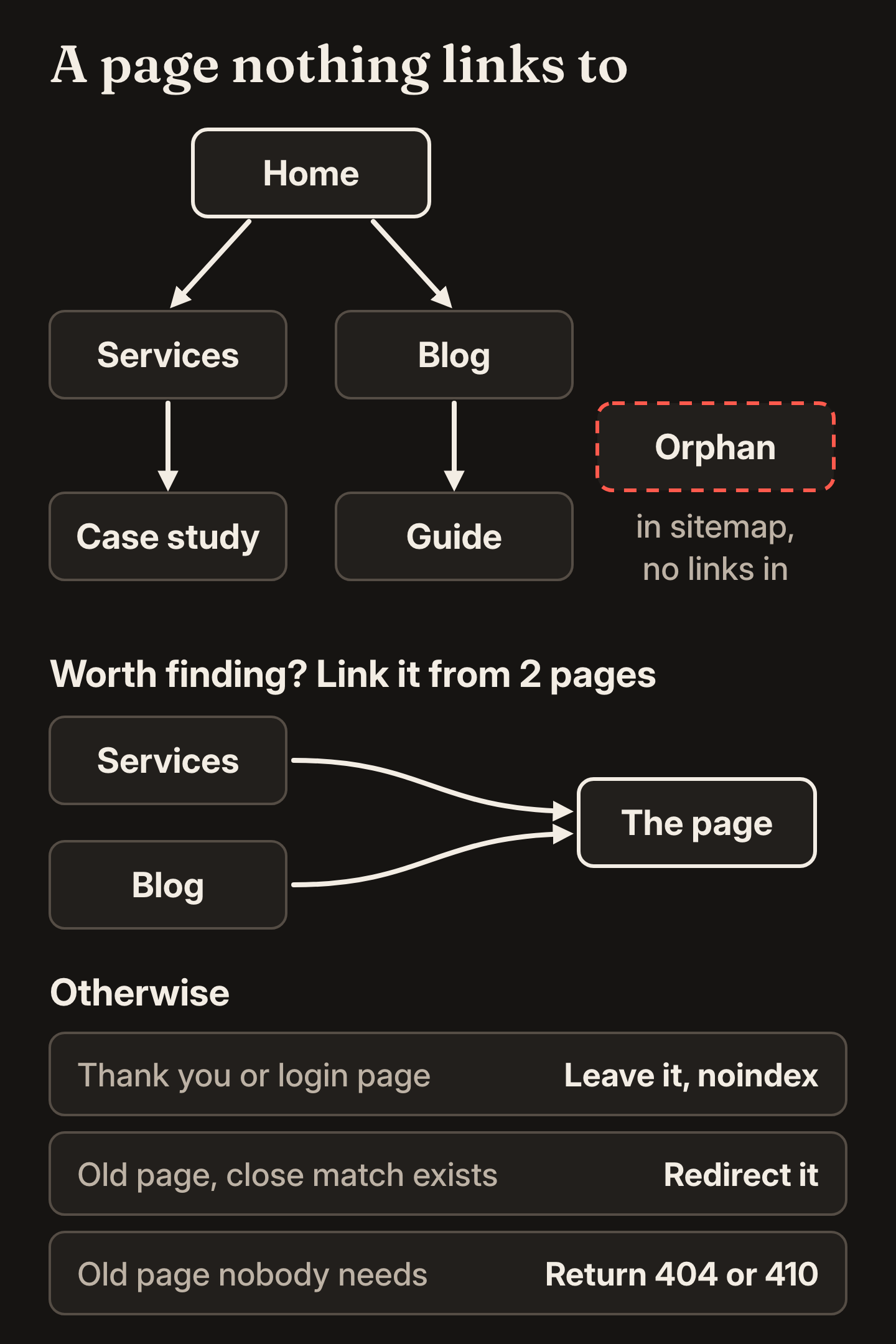
A site map shows one page in the sitemap with no internal links in. If it is worth finding, link it from two pages. A thank you or login page can stay unlinked with noindex. Redirect an old page with a close match, or return 404 or 410.
Orphan page. Add links from pages that already get visitors. A related article, a category page and the navigation are the usual homes. Use anchor text that says what the page is about. Google's link guidance says good anchor text is descriptive, reasonably concise and relevant to both pages, and that "click here" is too generic.
Only one link in. Add a second link from a different page, so one edit cannot orphan it. Sitewalk counts links from the pages it crawled, so the second link should sit on a page that is itself reachable.
Dead end page. Add links to related pages and check that the template still has its header, menu or footer. A page that stands alone on purpose, like a thank you page, can take noindex instead.
Only linked from noindex pages. Link to the page from at least one indexable page. Google's robots tag documentation defines noindex as do not show this page in search results, and nofollow as do not follow the links on this page. I did not find a statement in Google's documentation about how long Google keeps following links on a page that stays noindex, so treat those links as weak and add one from an indexable page.
Images as links. Google's guidance says it uses the alt attribute of the image as anchor text, so an image link with no alt text carries no anchor text. See images without alt text.
Common mistakes
- Adding the page to the sitemap and calling it fixed. A sitemap helps discovery and gives visitors nothing to click.
- Using "click here" or "read more" as the only anchor text.
- Building links with script events and no
href. - Linking a page from a noindexed archive and nowhere else.
- Redirecting an orphan to the home page. Send it to the closest match, or return 404 or 410.
Check it worked
- Run the script again. The orphan should drop out of the list, and the dead end should have an internal link out.
- Open a page that should link to the fixed page, click through, and confirm it loads.
- View the source of the linking page and confirm the link is an
<a>with anhref. - Check the target's canonical tag points to itself, so the links count toward the address you want shown.
- Run a new Sitewalk audit.
What Sitewalk found on real sites
Counted on 23 Nov 2026, from the latest audit of each site.
These are sites with at least one such page, on the latest audit of each site. This is a small early-user group, a first look and not a survey.
- 28 of 119 sites (24%) had an orphan page.
- 22 of 89 sites had a page with only one internal link in.
- 7 of 89 had a dead end page.
- 3 of 89 had a page linked only from noindex pages.
Questions people ask
What is an orphan page?
It is a page on your site that no other page links to. Visitors cannot reach it by clicking, and Google's crawlers cannot find it by following your links. Sitewalk counts an indexable page that no other crawled page links to.
Are orphan pages bad for SEO?
A page that matters and has no links is hard for Google to find. Google says it finds pages mainly through links, and that a sitemap can help larger or more complex sites. Pages like thank you pages are orphans on purpose and are fine.
Can Google find an orphan page?
Sometimes. Google's guidance says it can discover pages from links on other sites and from sitemaps. That path is less reliable than a link from your own pages, and it gives visitors no way in.
How do I find orphan pages?
Crawl your site from the home page, then compare the pages you reached with your sitemap, your analytics and your CMS. Anything on those lists that the crawl missed is an orphan. The script above does the first part.
How many internal links should a page have?
Google gives no number. Sitewalk flags pages with one link in because a single link is fragile, and our rule of thumb is at least two from different pages for anything you want found.
Should I delete orphan pages?
Only when they have no purpose. A page with value gets links. A leftover page gets a redirect to a close match, or a 404 or 410 if nothing is close.
Check your whole site in one sentence
Sitewalk maps the links between every page it crawls, along with 200+ other technical checks. In ChatGPT, say:
Audit example.com for technical SEO problems
Checked on 23 Nov 2026. Sources read on 23 Nov 2026: Google Search Central, "SEO Starter Guide", "Link best practices for Google", "Build and submit a sitemap" overview and "Robots meta tag, data-nosnippet, and X-Robots-Tag specifications". Sitewalk counts are from 119 and 89 audited sites, each site's latest audit: a small early-user group, a first look and not a survey.