Sitewalk / Guides / AI search and AI bots / JavaScript SEO
JavaScript SEO: when a page needs JS to show its text
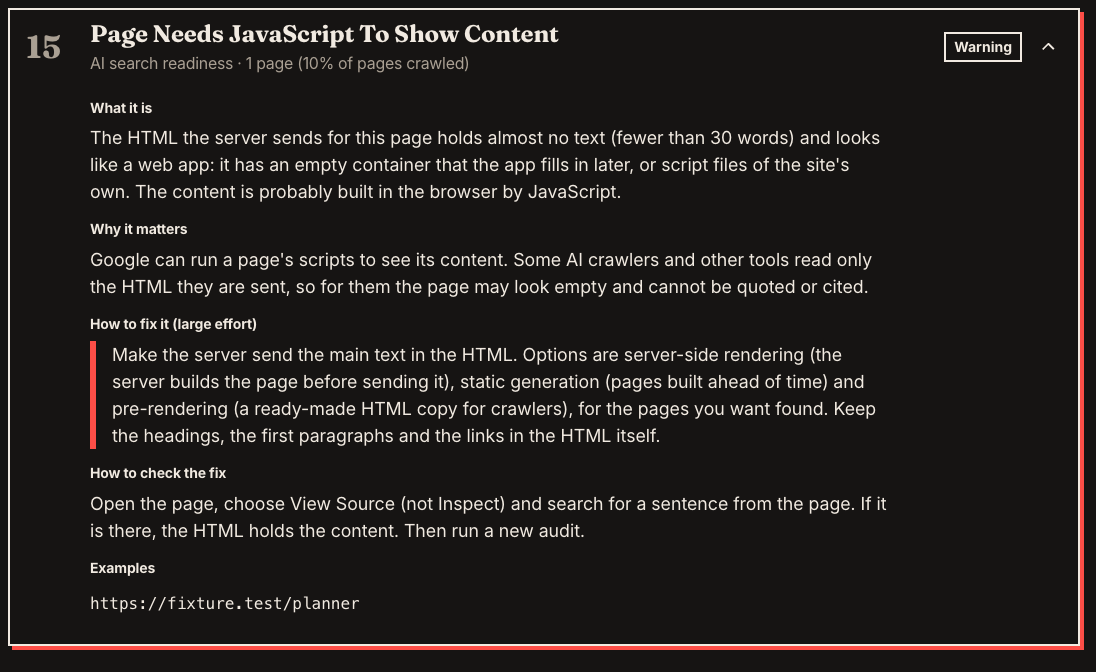
Some pages reach the browser as an empty shell, and a script then builds the text. Google can run that script and read the result. Other bots may read only the HTML the server sent, and for them the page can look empty.
This guide shows how to check what your server really sends, what Google says about it, and how to fix a page so the text is in the HTML.
What happens with a page that needs JavaScript
A classic page puts its words in the HTML. A JavaScript app often sends a short file with an empty container and some script files. The browser downloads the scripts, runs them and fills the container.
Google's documentation calls this the app shell model: the initial HTML does not contain the actual content, and Google has to execute JavaScript before it can see what the script generates. Google describes three phases for these pages: crawling, rendering and indexing. A page waits in a queue for rendering. Google says it may stay there for a few seconds, and that it can take longer.
So Google can do it. Google's page says it renders with an evergreen version of Chromium. The same page then adds a line that matters for everyone else: server-side or pre-rendering is still a great idea because it makes your site faster for users and crawlers, and not all bots can run JavaScript.
Sitewalk reads each page the way the simplest crawlers do. It raises this issue when the HTML holds fewer than 30 words and the page looks like a web app. Sitewalk rates the fix as a large effort.
What about AI crawlers
I looked for a statement from OpenAI, Anthropic and Perplexity on whether their crawlers run JavaScript, and I did not find one in the documentation I read. So this guide makes no claim about any named AI bot. Sitebulb's guide says that at the time of writing most standalone LLMs cannot render JavaScript, and that systems able to do it may not always do it. I treat that as a vendor opinion that I have not verified.
What you can say with confidence is narrower. Google says not all bots can run JavaScript. If the text is in the HTML, every bot that reads HTML can see it, whatever its rendering ability. That is the safe position, and it is why Sitewalk checks the HTML itself.
If you also want to control which AI bots may visit, see AI crawlers and robots.txt. A bot that is allowed in still cannot read text that is not in the HTML.
How to check your page in 2 minutes
- Open the page in your browser.
- Choose View Source. Do not choose Inspect. Inspect shows the page after scripts have run, and View Source shows what the server sent.
- Search for a full sentence from the body of the page.
If the sentence is there, the HTML holds your content. If it is missing and the source is a short file with an empty container and script tags, the content is built in the browser.
To get the same answer for many pages, use this script. It downloads the page the way a plain crawler does, drops script, style and noscript blocks, then counts the words left and looks for a phrase.
import re, sys, html, urllib.request

page = urllib.request.urlopen(sys.argv[1]).read().decode("utf8", "replace")
text = re.sub(r"(?s)<(script|style|noscript)[^>]*>.*?</\1>", " ", page)
text = html.unescape(re.sub(r"<[^>]+>", " ", text))
words = text.split()
print("words in the HTML the server sent:", len(words))
if len(sys.argv) > 2:
    print("phrase found:", sys.argv[2].lower() in " ".join(words).lower())
Save it as rawcheck.py and run python3 rawcheck.py https://example.com/ "a sentence from the page".
We tested it on two demo pages with the same text. On the shell page, where a script writes the heading and paragraph into an empty container, it printed words in the HTML the server sent: 1 and phrase found: False. On the server-rendered copy it printed 60 words and phrase found: True.
On 23 Nov 2026 we also ran it on sitewalkseo.com. The home page returned 3909 words and this guide's live page returned 2166 words, so both send their text in the HTML.
One trap came up in testing. A plain curl | grep for the sentence found it on the shell page too, because the sentence sat inside the script block as a string. Search with the script above, or look at the source and check that the sentence sits in the page body and not inside a <script> tag.
You can also see the other side. Google's documentation points to the URL Inspection tool in Search Console and the Rich Results Test to look at the rendered HTML that Google ends up with. Compare it with the raw HTML to see what only exists after rendering.
Read your result
| What you see | What it means | What to do |
|---|---|---|
| Headings and paragraphs are in View Source | The server sends the content | Nothing to fix here |
| Only an empty container and script tags | The content is built in the browser | Move rendering to the server, see below |
| Main text is there, a sidebar or review block is not | Part of the page is built by script | Decide if that part matters for search |
| Text is there, links are not | Menus are built by script | Make links real <a href> elements |
| Page is short because it is short | A small word count has nothing to do with JavaScript | Check thin content instead |
How to fix it
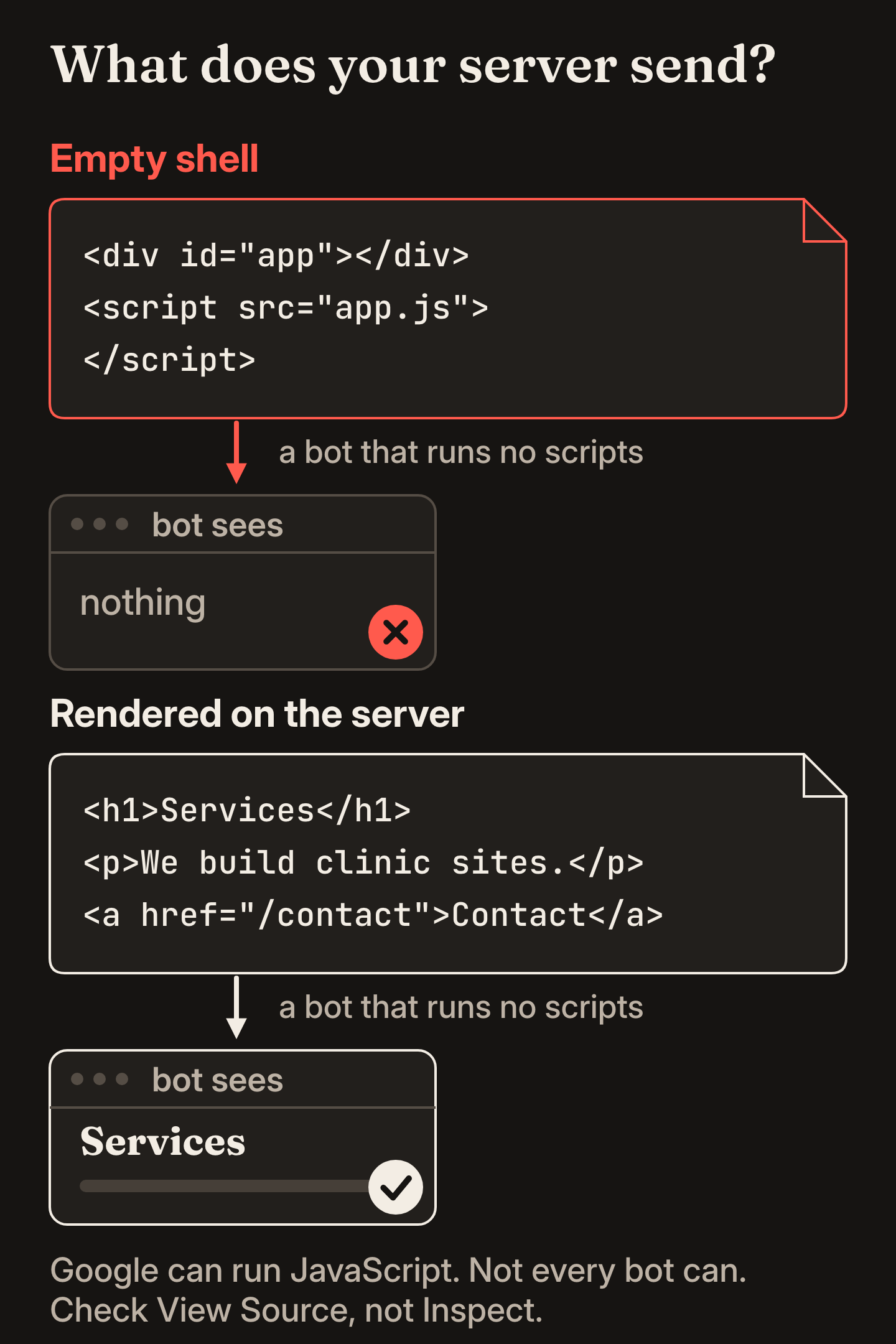
Text version
An empty app shell sends only a container and a script, so a bot that runs no scripts sees nothing. A server rendered page sends headings, text and links, which the bot can read. Google can run JavaScript, but not every bot can.
You want the server to send the main text. web.dev describes the options in its guide to rendering on the web.
Server-side rendering. The server builds the full HTML for a page in response to each request. web.dev says you are really just sending text and links to the browser, and that it generally gives a fast first paint. It also warns that the dynamic work can cost server time, and that you may need caching.
Static rendering. The HTML is built ahead of time, at build time. web.dev says this gives consistently fast response because nothing has to be generated per request. The drawback is that it must generate a file for every possible URL, which is hard on sites with many unique pages.
Pre-rendering. web.dev says static rendering and pre-rendering behave differently. Statically rendered pages are interactive without much client-side script. Pre-rendered pages may show their text but stay mostly inert until the scripts run. For search, both put the text in the HTML.
web.dev gives a simple test to tell them apart: turn JavaScript off and load the page. You can use the same test on your own site. If the text is still there, the HTML carries it.
Dynamic rendering. This means serving a ready-made HTML copy to crawlers. Google's documentation calls it a workaround and not a recommended solution, because it adds complexity and resource needs. Google says it is not cloaking as long as the content is similar. Use it only if you cannot change how the app renders.
Which one to pick. Start with your own situation.
| Your site | A reasonable choice |
|---|---|
| Content changes rarely, URLs are known ahead | Static rendering |
| Content changes with each visit or user | Server-side rendering with caching |
| A large app you cannot change soon | Pre-render the public pages first |
| Public pages are few and the app sits behind a login | Render only the public pages on the server |
web.dev notes you can choose server-side rendering for some pages and not others. Start with the pages you want found: the home page, product or service pages and your articles. A login screen can stay as it is.
Keep these in the HTML, whatever you pick
Google's JavaScript guidance gives a few rules that apply to every approach.
- Links. Google can discover links only when they are
<a>elements with anhref. For single page apps, Google says to use the History API for routing and not URL fragments such as#/products. See orphan pages for what happens to pages with no crawlable link. - Canonical. Google says the best way to set the canonical URL is in HTML. If you set it by script, it must match the canonical in the original HTML. See canonical tags.
- Titles and descriptions. Google says JavaScript can set the title and meta description. Putting them in the HTML is still simpler, since they are part of what a plain crawler reads.
- Status codes. Use a real
404for a missing page. In client-rendered apps where that is impractical, Google suggests redirecting by script to a URL that returns404, or addingnoindexto the error page by script, to avoid soft 404 errors.
Google also says it does not render JavaScript from files or pages blocked by robots.txt, so do not block your scripts.
Common mistakes
- Checking with Inspect and assuming that is what bots receive.
- Moving only the first paragraph to the server and leaving headings, links and the rest to the script.
- Building menus with script events and no
href. - Setting a canonical or
noindexin script that differs from the one in the HTML. - Blocking script files in robots.txt, so Google cannot render the page.
- Using fragment URLs for different views of the same app.
- Treating a short page as a rendering problem. Check how the words got there first.
Check it worked
- Run
rawcheck.pyagain and confirm the word count is well above 30 and the phrase is found. - Open View Source and confirm the headings, the first paragraphs and the main links sit in the HTML.
- Turn JavaScript off in your browser and load the page. The text should still be there.
- Look at your page in the URL Inspection tool and compare the rendered HTML with the raw HTML.
- Run a new Sitewalk audit.
What Sitewalk found on real sites
Counted on 23 Nov 2026, from the latest audit of each site.
Of 89 audited sites, on the latest audit since this check went live on 4 Nov 2026, 14 (16%) had a page like this. This is a small early-user group, a first look and not a survey.
Questions people ask
Does Google render JavaScript?
Yes. Google's documentation says Google Search runs JavaScript with an evergreen version of Chromium. Pages are queued for rendering, which can take longer than a few seconds, and the rendered HTML is used for indexing.
Is client-side rendering bad for SEO?
Google can index client-rendered pages, so it is not a ban. The risk is for tools that read only the HTML, and for the delay in the rendering queue. Server-side or pre-rendering is still a great idea, in Google's words.
Can AI crawlers read JavaScript content?
I did not find official statements from the major AI companies on this, so I cannot say. Google says not all bots can run JavaScript. Text that is in the HTML does not depend on the answer.
What is the difference between View Source and Inspect?
View Source shows the HTML the server sent. Inspect shows the page after scripts have changed it. For this check, View Source is the one that matters.
Is dynamic rendering a good fix?
Google calls it a workaround and not a recommended solution. It works, and it adds complexity and cost. Server-side rendering or static rendering is the better long term fix.
How many words should the HTML contain?
Sitewalk raises the issue under 30 words on a page that looks like a web app. That is Sitewalk's threshold, and Google gives no word count for this.
Check your whole site in one sentence
Sitewalk reads each page as the server sends it, along with 200+ other technical checks. In ChatGPT, say:
Audit example.com for technical SEO problems
Checked on 23 Nov 2026. Sources read on 23 Nov 2026: Google Search Central, "Understand the JavaScript SEO basics" and "Dynamic rendering as a workaround"; web.dev, "Rendering on the Web"; Sitebulb, "JavaScript SEO". Sitewalk counts are from 89 audited sites, each site's latest audit since 4 Nov 2026: a small early-user group, a first look and not a survey.