Sitewalk / Guides / AI search and AI bots / AI crawlers and robots.txt
AI crawlers and robots.txt: what to allow and block
AI tools read your site with their own crawlers, and your robots.txt decides which ones may come in. The main thing to get right is that search crawlers and training crawlers are separate, so you can stay in AI search answers and still opt out of model training.
This guide shows how to read your robots.txt for AI bots, the one line that blocks everything by accident, how to test whether your firewall turns the crawler away, and what to change.
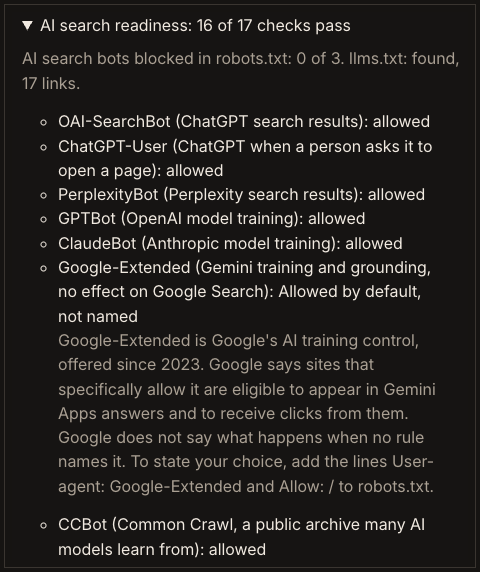
Search bots, training bots and user bots
Each company runs more than one crawler, and each one has its own name in robots.txt. OpenAI says its settings are independent: you can allow OAI-SearchBot to appear in search results and disallow GPTBot to say your content should not be used to train its models.
| Company | Crawler | What it does | Blocking it means |
|---|---|---|---|
| OpenAI | OAI-SearchBot | Surfaces sites in ChatGPT search | Your site will not be shown in ChatGPT search answers, though it can still appear as a navigational link |
| OpenAI | GPTBot | Crawls content that may be used for training | You ask OpenAI not to train on your content |
| OpenAI | ChatGPT-User | Visits a page when a user asks ChatGPT or a Custom GPT | OpenAI says robots.txt rules may not apply, because a user starts the visit |
| Anthropic | ClaudeBot | Collects content that could contribute to training | Your future content is excluded from training sets |
| Anthropic | Claude-SearchBot | Improves search result quality | Your content is not indexed for Claude search, which may reduce visibility |
| Anthropic | Claude-User | Fetches pages when a user asks Claude | Claude cannot fetch your content for a user's question |
| Perplexity | PerplexityBot | Surfaces and links sites in Perplexity search | Perplexity recommends allowing it so your site appears in its search results |
| Perplexity | Perplexity-User | Fetches pages for a user's question | Perplexity says it generally ignores robots.txt here, because a user asked |
| Google-Extended | A token that controls use for Gemini training and grounding | Google says it does not affect inclusion in Google Search or act as a ranking signal |
Two details from the OpenAI page are easy to miss. ChatGPT-User is not used to decide whether content may appear in Search. OpenAI says to use OAI-SearchBot in robots.txt for Search opt-outs. Second, a change to robots.txt can take about 24 hours to take effect for search.
Google-Extended has no user agent string of its own. Google crawls with its existing user agents, and the token only works as a control in robots.txt.
How to check yours
Open https://example.com/robots.txt and read it from top to bottom. Look for two things: groups that name an AI bot, and any group under User-agent: *.
User-agent: GPTBot
Disallow: /
Disallow: / under a bot name closes the whole site to that bot. A Disallow with a path closes only that path.
Now the line that causes most accidents.
User-agent: *
Disallow: /
This closes the site to every crawler that has no group of its own, which includes OAI-SearchBot, PerplexityBot and Claude-SearchBot. Sites often have it left over from a staging copy or a launch.
We tested these cases with Python's urllib.robotparser on 23 Nov 2026, using the address https://example.com/guide/. Other crawlers may read edge cases differently, so treat this as a guide.
| robots.txt | OAI-SearchBot | GPTBot | PerplexityBot | ClaudeBot |
|---|---|---|---|---|
User-agent: * with Disallow: / | blocked | blocked | blocked | blocked |
Same, plus a group for OAI-SearchBot and PerplexityBot with Allow: / | allowed | blocked | allowed | blocked |
A group for GPTBot with Disallow: /private/ only | allowed | allowed | allowed | allowed |
A bot that has its own group follows that group and ignores the * group. That is why the second row works.
We also read our own robots.txt on 23 Nov 2026. It has one group, User-agent: *, with three Disallow lines for internal paths. The same parser says OAI-SearchBot, GPTBot, ChatGPT-User, PerplexityBot, ClaudeBot, Claude-SearchBot and Google-Extended may all fetch /guides/.
Check the two places that are not in robots.txt
A robots.txt can look perfect and a crawler can still be turned away. Check headers and the page source.
curl -sI https://example.com/
Look for an x-robots-tag line. Google's documentation says any rule that works in a robots meta tag also works in an X-Robots-Tag header, and that the header can name a user agent before the rules, for example X-Robots-Tag: otherbot: noindex. A plugin, a CDN setting or a server rule can add it, and nobody sees it in the page source. Our home page returned no x-robots-tag header on 23 Nov 2026.
In the page source, search for name="robots". Our home page has no robots meta tag. If yours names an AI bot or carries an opt-out value such as noai, someone added it on purpose or a plugin did. We found no documentation we could cite that says AI tools honor noai, so treat it as a request that some systems may ignore.
Test whether your firewall turns the crawler away
This is the problem robots.txt cannot show you. Your robots.txt says OAI-SearchBot is welcome, and a firewall or bot protection rule at your host refuses it anyway. OpenAI recommends allowing OAI-SearchBot in robots.txt and allowing requests from its published IP ranges.
Test it by sending a request with the crawler's name.
curl -s -o /dev/null -w "%{http_code}, redirects %{num_redirects}\n" -A "OAI-SearchBot/1.4" https://example.com/
You want 200, redirects 0. A 403, a 429, a redirect to a challenge page or a much shorter page means a rule is acting on the user agent. OpenAI's page lists OAI-SearchBot/1.4 in its example user agent and says the version number may change, so check the page for the current one.
We ran this on our own site on 23 Nov 2026 with OAI-SearchBot/1.4, GPTBot/1.4 and a normal browser name. All three returned 200, redirects 0.
To see what a blocking rule looks like, we built a local Apache test with a robots.txt that welcomes everyone and a server rule that refuses any user agent containing "bot". A request with OAI-SearchBot/1.4 returned 403. A request with Mozilla/5.0 returned 200. Your own rule will look different, and the test is the same.
A user agent test cannot prove a firewall that checks IP addresses. If the test passes and you still suspect a block, look in your host or CDN dashboard for bot rules and compare them with the IP lists the companies publish. OpenAI and Perplexity both publish theirs, and Anthropic's page says blocking by IP address may not give you a reliable opt-out because it stops its bots from reading your robots.txt.
How to fix each problem
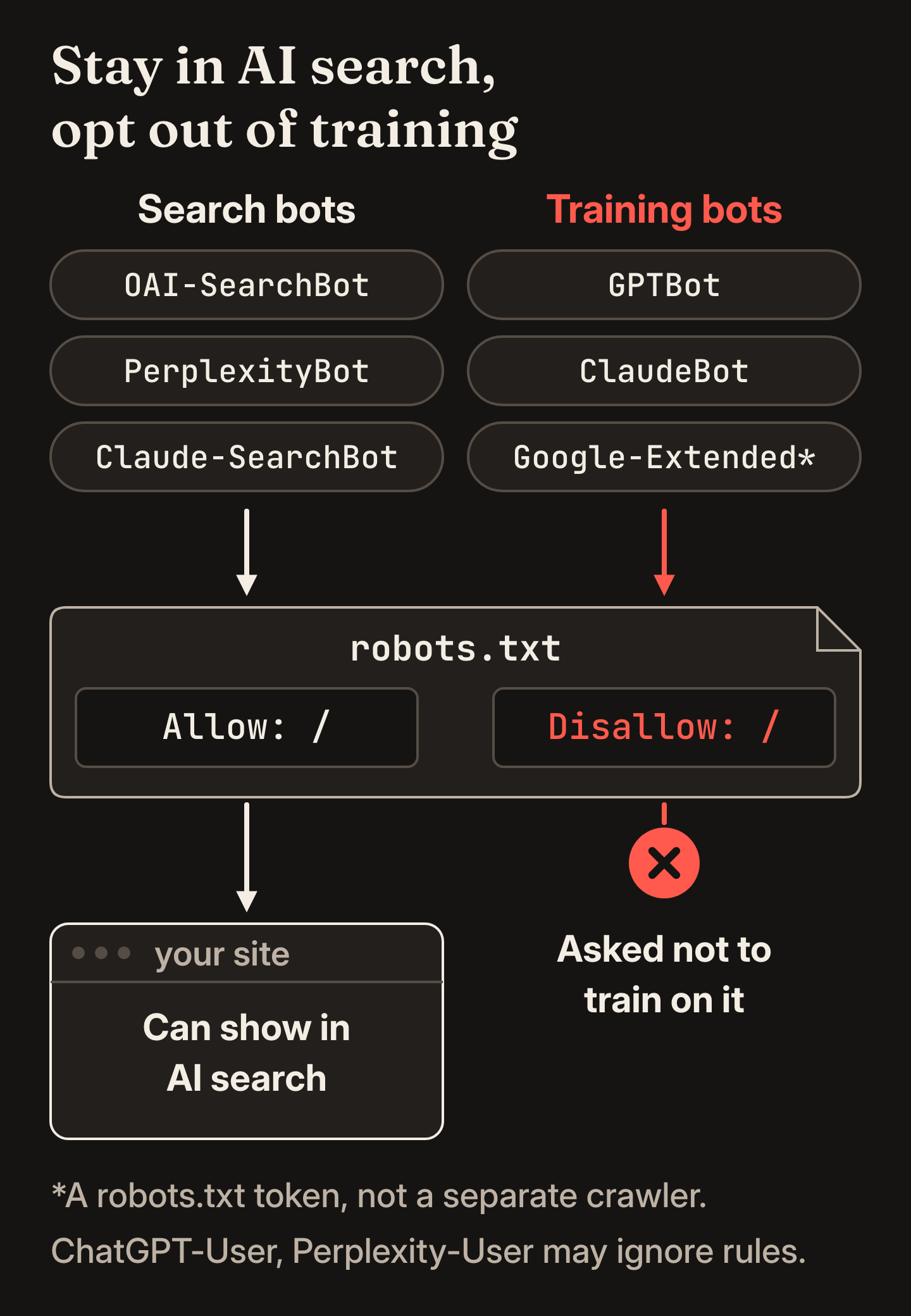
Text version
An example robots.txt choice. Search bots OAI-SearchBot, PerplexityBot and Claude-SearchBot get Allow and can show your site in AI search. GPTBot, ClaudeBot and the Google-Extended token get Disallow, asking them not to train on it. ChatGPT-User and Perplexity-User may ignore these rules.
| Problem | What it means | Fix |
|---|---|---|
| Search bot blocked | OAI-SearchBot, PerplexityBot or Claude-SearchBot is disallowed, directly or by User-agent: * | Add a group for the bot with Allow: /, or remove the Disallow rule. If you blocked it on purpose, leave it |
| Training bot blocked | GPTBot, ClaudeBot or Google-Extended is disallowed | Nothing to fix if you meant it. Remove the rule if you want your content used for training |
| Partly blocked | A rule closes some paths | Check that the closed paths hold nothing you want cited. Narrow the rule if they do |
| Blocked by header | An X-Robots-Tag header names an AI search bot | Find where it is set in the server, CDN or plugin and remove it |
| Opt-out header or tag | noai or similar is set in a header or meta tag | Remove it where it is set if it was not on purpose |
| Crawler answers differently | The bot gets an error, a redirect or less content than a visitor | Allow the bot in the firewall or CDN, using the published IP ranges |
Here is a robots.txt that keeps your site in AI search and opts out of training. It is the first case in our parser test.
User-agent: OAI-SearchBot
Allow: /

User-agent: PerplexityBot
Allow: /

User-agent: Claude-SearchBot
Allow: /

User-agent: GPTBot
Disallow: /

User-agent: ClaudeBot
Disallow: /

User-agent: Google-Extended
Disallow: /
Whether to opt out of training is your call, and neither choice is wrong. Both companies document their search crawlers as separate bots from the training crawlers. Opting in means your content may be used to train models.
Anthropic's page adds that from 30 Oct 2026 it recognizes a machine-readable "no AI training" signal based on an IETF draft, and that rules naming ClaudeBot take priority over it. The page says the way it reads these settings may change.
Common mistakes
- Blocking GPTBot and expecting to leave ChatGPT search. They are separate. Blocking GPTBot does not stop OAI-SearchBot.
- Blocking OAI-SearchBot to stop training. That removes you from ChatGPT search answers and does nothing about training.
- Leaving
Disallow: /from a staging copy. Check the live file the week after any launch. - Putting the rules in the wrong file. Each subdomain needs its own robots.txt. Anthropic says the same for opting out.
- Using robots.txt as security. Google's introduction says robots.txt is not a way to keep a page out of Google and that some crawlers may not obey it. Use passwords for private files.
- Hiding content behind scripts. A crawler that is allowed in still needs text to read. See our guide on pages that need JavaScript to show content.
Check it worked
- Open
/robots.txtand read the groups once more. - Re-run the
curluser agent test for each search bot you allowed and confirm200, redirects 0. - Check
curl -sIfor anx-robots-tagline and search the page source forname="robots". - Wait about a day for OpenAI search to pick up a robots.txt change.
- If a redirect is involved, check that it is a single hop. Our guide on redirect chains and loops shows how.
- Re-run the Sitewalk audit.
What Sitewalk found on real sites
Counted on 23 Nov 2026, from the latest audit of each site.
Of 89 audited sites, using each site's latest audit since these checks went live on 4 Nov 2026:
- 1 blocked an AI search bot in robots.txt (1.1%). None blocked one with a header.
- 8 (9.0%) blocked at least one training bot.
- 2 (2.2%) had a rule that closes some paths to an AI bot.
- 0 had an opt-out header or meta tag.
- 0 turned the search crawler away with a different answer.
The worry that sites shut AI search out by accident is not what these audits show: it was 1 site in 89. This is a small early-user group, a first look and not a survey.
Questions people ask
What is the difference between GPTBot and OAI-SearchBot?
GPTBot crawls content that may be used to train OpenAI's models. OAI-SearchBot surfaces sites in ChatGPT search. OpenAI says each setting is independent, so you can allow one and disallow the other.
Should I block AI crawlers?
It depends on what you want. If you want to appear in AI search answers, allow the search bots. If you do not want your content used for training, disallow the training bots. Many sites do both.
If I block GPTBot, will I disappear from ChatGPT?
OpenAI's page says OAI-SearchBot controls whether a site is shown in ChatGPT search answers, and that GPTBot is for training. Blocking GPTBot alone does not change search.
Does ChatGPT-User follow robots.txt?
OpenAI says that because a user starts those visits, robots.txt rules may not apply. Perplexity says the same about Perplexity-User. Use the search bot rules to manage search and automatic crawling.
Does blocking Google-Extended affect my Google rankings?
Google's documentation says Google-Extended does not impact inclusion in Google Search and is not a ranking signal.
How do I know if my firewall blocks AI crawlers?
Send a request with the crawler's user agent using curl -A and look for 200. If you get a 403, a 429 or a redirect, a rule at your host or CDN is acting on the user agent. A test by user agent cannot prove an IP-based rule.
Check your whole site in one sentence
Sitewalk reads your robots.txt, your headers and how your site answers the search crawler, along with 200+ other technical checks. In ChatGPT, say:
Audit example.com for technical SEO problems
If you also want to give AI tools a short guide to your best pages, see our guide on llms.txt.
Checked on 23 Nov 2026. Sources, all read on 23 Nov 2026: OpenAI crawlers, Anthropic crawler article, Perplexity crawlers, Google common crawlers, Google robots.txt introduction, Google robots meta tag and X-Robots-Tag. Counts are from 89 audited sites, each site's latest audit since the checks went live on 4 Nov 2026, counted on 23 Nov 2026: a small early-user group, a first look and not a survey.