Sitewalk / Guides / Redirects and status codes / Too many redirects
Too many redirects: fix redirect chains and loops
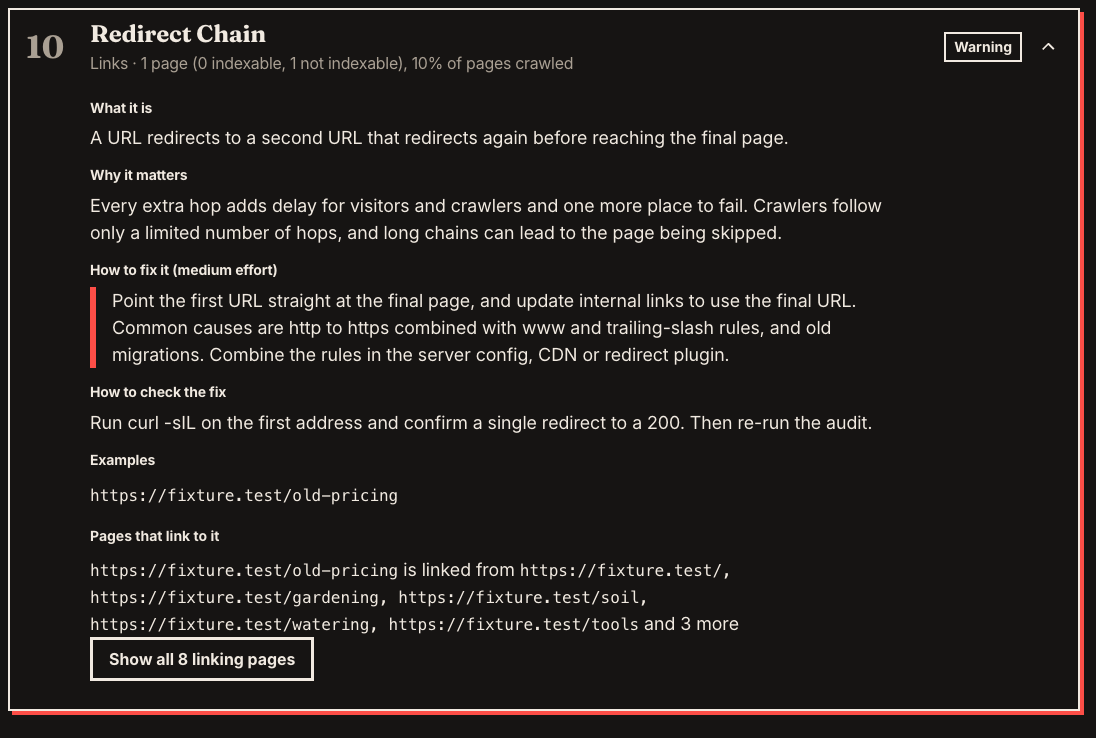
A redirect chain is an address that sends visitors through two or more redirects before a page loads. A redirect loop sends them round in a circle and never reaches a page, which is what browsers report as "too many redirects".
This guide shows you how to trace any address in one command, how to find the rule behind a chain or a loop, and how to fix both so every old address lands on its final page in one step.
What chains and loops are and why they matter
A redirect answers a request with "go to this other address" instead of a page. One redirect is normal. You moved a page, you want https, you picked www.
A chain happens when the answer to that second address is another redirect. For example, http://www.example.com/page goes to http://example.com/page, which goes to http://example.com/page/, which finally shows the page. Two hops to do one hop's job.
A loop happens when the rules point back at each other. Address A sends you to B, and B sends you to A. Nothing ever shows.
Here is what each one costs.
- Chain: every extra hop is an extra request for a visitor and a crawler. Google says its crawlers follow up to 10 redirect hops by default, and that the content of the redirecting addresses is ignored in favour of the final one. A chain of 3 or 4 is well inside that limit. It still adds delay and one more place to break.
- Loop: browsers stop with an error. MDN says the user can do little about it, unless the cause is a mismatch of cache or cookies on their own side. Crawlers cannot reach the page either, so it cannot be used or indexed.
Which kind of redirect you use also matters. Google says permanent redirects show the new target in search results, and temporary ones show the source page.
Googlebot uses a permanent redirect as a signal that the target should be canonical. The permanent codes are 301 and 308. The temporary ones are 302, 303 and 307.
How to check yours
To trace one address, ask for the headers and let curl follow the redirects:
curl -sIL https://example.com/old-page | grep -iE "^HTTP|^location"
Read the output top to bottom. You want one redirect and then 200. Two or more redirects is a chain. The same addresses repeating is a loop.
To get only the count and where you ended up:
curl -sL -o /dev/null --max-redirs 10 -w "%{num_redirects} redirects, final %{http_code} %{url_effective}\n" http://www.example.com/page
We ran that on 26 Nov 2026 on our own site. http://sitewalkseo.com/ printed 1 redirects, final 200 https://sitewalkseo.com/, and http://www.sitewalkseo.com/guides/canonical-tags/ printed 1 redirects, final 200 on the https address without www. Both reach the page in a single hop, which is the target.
To check every page in your sitemap, save this as redir_all.sh and make it executable. It follows each address, up to 10 redirects, and lists the ones that took more than one.
#!/bin/bash
# usage: redir_all.sh https://example.com/sitemap.xml
curl -s "$1" | grep -o "<loc>[^<]*</loc>" | sed 's/<[^>]*>//g' | while read -r u; do
  curl -sL -o /dev/null --max-redirs 10 -w "%{num_redirects} %{http_code} $u\n" "$u"
done | sort -rn | awk '$1>1 {print "CHECK  " $0; bad++} END {print NR " pages, " bad+0 " with more than one redirect"}'
Run it with the address of your sitemap:
./redir_all.sh https://example.com/sitemap.xml
On the sitewalkseo.com sitemap it printed 46 pages, 0 with more than one redirect. On a local Apache test site with a chain, a loop and a clean page, it printed this:
CHECK  10 301 http://example.com:8795/a
CHECK  2 200 http://www.example.com:8795/page
CHECK  2 200 http://example.com:8795/old
4 pages, 3 with more than one redirect
The first line is the loop. It ran out at 10 redirects and never reached a 200. The other two are chains of two hops that end in 200.
Your sitemap lists pages, but chains also hide in links. A link in your menu to an old address works for a visitor and still costs a hop. Our guide on broken external links has a method for checking links across a site.
Where chains come from
Almost every chain is a few sensible rules stacked on top of each other. Each rule is right on its own and nobody checked the sum.
| Stack | The hops |
|---|---|
| www rule, then trailing slash rule | www.example.com/page to example.com/page to example.com/page/ |
| http to https rule, then www rule | http://www to https://www to https:// without www |
| Page moved, then moved again | /old to /newer to /newest |
| Plugin redirect and server redirect | One layer redirects, the next layer redirects again |
The fix has one idea. Work out the final address, then send every other version straight to it.
How to fix a chain
Here is a chain on Apache. These rules, tested on 23 Nov 2026 on Apache 2.4 with mod_rewrite, make www.example.com/page take two hops and /old take two hops:
RewriteCond %{HTTP_HOST} ^www\. [NC]
RewriteRule ^ http://example.com%{REQUEST_URI} [R=301,L]
RewriteRule ^/page$ /page/ [R=301,L]
RewriteRule ^/old$ /newer [R=301,L]
RewriteRule ^/newer$ /newest.html [R=301,L]
The trace gave 301 to /page, then 301 to /page/, then 200. For /old it gave 301 to /newer, 301 to /newest.html, then 200.
Here are the same redirects combined:
RewriteCond %{HTTP_HOST} ^www\. [NC]
RewriteRule ^/page$ http://example.com/page/ [R=301,L]
RewriteCond %{HTTP_HOST} ^www\. [NC]
RewriteRule ^ http://example.com%{REQUEST_URI} [R=301,L]
RewriteRule ^/page$ /page/ [R=301,L]
RewriteRule ^/old$ /newest.html [R=301,L]
RewriteRule ^/newer$ /newest.html [R=301,L]
The trace gave one 301 to /page/ and then 200. For /old it gave one 301 to /newest.html and then 200.
The order matters. The rule that handles two things at once, www and the trailing slash, comes before the rules that handle each alone, and each has L so processing stops at the first match. The old /newer address still has a rule, because other sites and bookmarks may still point at it.
The test used http and a local port so it could run on one machine. On a real site the target would be your https address.
Steps for any platform:
- Trace the address with
curl -sILand write down every hop. - Decide the final address.
- Change the first redirect so it points at the final address.
- Update your internal links, sitemap and canonical tags to the final address as well, so nothing relies on the redirect.
- Use
301or308unless the move is temporary.
If you cannot edit the server, your host, CDN or redirect plugin is where the rules live. Look for a setting that forces https and one that picks www or not, and check that you only have one place doing each.
How to fix a loop
A loop is two or more rules that undo each other. This Apache pair, tested on 23 Nov 2026, makes one:
RewriteRule ^/a$ /b [R=301,L]
RewriteRule ^/b$ /a [R=301,L]
Tracing it with curl -sIL --max-redirs 5 printed /b, /a, /b, /a, /b, /a and then stopped, and curl exited with code 47, which is its "too many redirects" code.
To find the cause of a real one:
- Trace the address and read the two or three addresses that repeat. Those are the ones involved.
- List every place that can redirect: the server config,
.htaccess, your CDN, your CMS settings and any redirect plugin. - Find the two rules that send the address back and forth. Common pairs are an http to https rule in one place and an https to http rule in another, or a www rule in the CDN and a non www rule in the CMS.
- Remove or change one of them so the address ends at a normal page.
- Clear the caches. A cached redirect can keep a loop alive after the rule is gone.
MDN says that if a server catches a loop itself it may answer 500 Internal Server Error, so a 500 soon after you change a config is a hint. When the loop spans several servers, none of them see it, and the browser shows the error instead.
If you see "too many redirects" in your own browser but your trace is clean, clear the cookies and cache for that site, and try a private window. MDN names a cache or cookie mismatch as a cause on the visitor's side.
Common mistakes
Using a 302 where a 301 belongs. Google says a temporary redirect keeps the source page in results. For a permanent move, use 301 or 308.
Redirecting in the page instead of the server. Google says server side redirects have the highest chance of being read correctly. A meta refresh or JavaScript redirect is a second choice, and MDN warns that mixing HTML and HTTP redirects can cause an infinite loop.
Setting the same redirect in two layers. A host, a CDN and a plugin can each do their own https redirect. Pick one.
Leaving a canonical tag on a redirecting address. If a tag names an address that redirects, search engines get a mixed message. Our guide on canonical tags covers it.
Checking only the address you changed. Trace the http, https, www and non www versions. Our guide on www and https versions shows the four traces.
Check it worked
- Trace the address again with
curl -sIL. You should see one301and then200. - Run
redir_all.shon the sitemap. The count ofCHECKlines should be 0, or only addresses you chose to leave. - Open the address in a private browser window and confirm it loads.
- Click through three internal links and confirm none of them goes through a redirect.
- Re-run the Sitewalk audit and compare.
What Sitewalk found on real sites
Counted on 23 Nov 2026, from the latest audit of each site.
Sites with at least one such address, on the latest audit of each of 119 audited sites:
- 6 of 119 sites (5%) had a redirect chain.
- No site had a redirect loop, so there is no number for loops.
- 21 of 119 sites (18%) had an internal link that points to a redirecting page, and 8 of 119 had a sitemap that lists a redirecting address. These are the places where chains tend to start.
This counts sites with at least one case, not that share of pages. It is a small early-user group, a first look and not a survey.
Questions people ask
What causes too many redirects?
A redirect loop. Two or more rules send a request back and forth, and the browser gives up after several rounds. The usual cause is the same redirect set in two places that disagree, such as the host and the CMS.
How many redirects is too many?
One is the aim for any address. Google says its crawlers follow up to 10 redirect hops by default, so longer chains risk not being followed. Anything above one is worth tidying even when it works.
Does a redirect chain hurt SEO?
Google follows chains and uses the final address. I did not find a statement in the Google pages I read that says a chain lowers rankings. It adds delay and fragility, and a long one can cross the 10 hop limit.
Should I use a 301 or a 302?
Use a 301 or 308 when the old address is gone for good. Use a 302 or 307 when the move is temporary, because Google keeps showing the source page for those.
How do I fix too many redirects on WordPress?
Trace the address first, then look at the places that can redirect: your SEO or redirect plugin, the site address settings, your host, your CDN and the server config. The loop is usually two of them disagreeing, and removing one of the two fixes it.
Check your whole site in one sentence
Audit example.com for technical SEO problems
Checked on 23 Nov 2026. Sources, all read on 23 Nov 2026: Google Search Central, "Redirects and Google Search" (developers.google.com/search/docs/crawling-indexing/301-redirects) and "How HTTP status codes affect Google's crawlers" (developers.google.com/search/docs/crawling-indexing/http-network-errors); MDN, "Redirections in HTTP" (developer.mozilla.org/en-US/docs/Web/HTTP/Guides/Redirections). The curl commands, the script and the Apache rules were run on 23 Nov 2026, and Sitewalk counts are from 119 audited sites, each site's latest audit.